Level 3
June 23, 2023
Solved

Windows 11 updates 2021 not saving

  • June 23, 2023
  • 11 replies
  • 96 views

Anyone have a solution?

This topic has been closed for replies.
Best answer by IntuitEric

This workaround will leave the Client Letter/Invoice/Client Checklist going to a different printer, but will allow the impacted year of ProSeries to save, while we research a solution.


All steps below are for ProSeries 2021 Professional, but can be followed for prior years as well. Just replace "21" in these steps with the desired year (20, 19, 18).


Change Letter/Invoice Printer in ProSeries

  • Launch ProSeries 2021
  • Go to File / Print Options...
  • Select Printer, PDF, and DMS Setup
  • Change the Client Letters/Invoice/Client Checklist Printer to a different print driver
  • Save a client file to verify


If still unable to save

  • Close ProSeries 2021
  • Browse to C:\Prowin21\32bit
  • Open Prowin21.ini in notepad
  • Look for the following line under the [GlobalOptions] section
    • LetterInvoicePrinter=HP LaserJet 1022 Class Driver,winspool,LPT1:
    • This line will always start with LetterInvoicePrinter=, the rest will appear different depending on your selected printer
    • Delete this entire line
  • Save and close the Prowin21.ini file
  • Repeat the steps under Change Letter/Invoice Printer in ProSeries

Work arounds are no longer necessary.  Through collaboration between Microsoft and ProSeries developers, a solution has been found. It involves downloading a MSI file and editing it.  

Steps to repair Windows 11 to allow ProSeries 2021 (and prior years) to Save (this includes Printing/Efiling/Restoring client files)

  1. Download the Microsoft MSI file from this link
  2. Unzip the file (Win11_KB5026446_Issue_Rollback.zip)
  3. Double click the unzipped msi file (Windows 11 22H2 KB5026446 230427_03057 Known Issue Rollback.msi) to install it
    • Installing this msi could trigger your computer to reboot

After installing the MSI file, its group policy needs to be edited

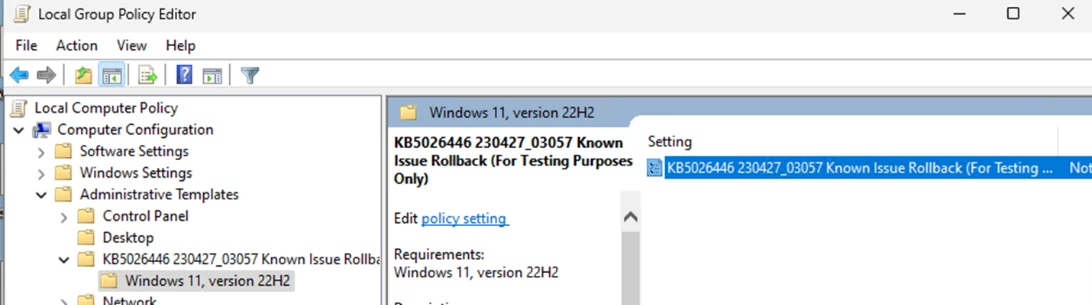
  1. Open gpedit.msc. (edit group policy)
    1. Go to Windows Search
    2. Type gpedit.msc
    3. Then double click the Edit Group Policy, to launch it
  2. Find the following
    1. Under Computer Configuration
    2. Then Administrative Templates
    3. Then KB5026446 230427_Known Issue Rollback (For Testing Purposes Only)
    4. Then Windows 11, version 22H2
  3. Double-click on the highlighted item.
    • KB5026446 230427_03057 Known Issue Rollback (For Testing Purposes Only)
  4. Configure it as "Disabled"
    1. Select the Disabled bullet
    2. Then press Ok
  5. Reboot the machine and test ProSeries 2021 (and/or prior years).
    • save client
    • print client return/letter/invoice

11 replies

George4Tacks
Level 15
June 23, 2023
Accountant-Man
Level 13
September 22, 2023

I just downloaded the Hub and used it on 2020, 2021 and 2022 2021still refuses to save, and just closes after it spins for a while.

What do you think about that long winded download this windows file and do this, do that, edit that, then PC reboots?

** I'm still a champion... of the world! Even without The Lounge.
Level 4
September 23, 2023

Proseries has fixed this issue.  I can't tell you exactly what has been done but 2021 now works on my Windows 11 Home edition laptop.  If anyone still is having this issue, I suggest you call Proseries tech to see what needs to be done to resolve the issue.

Level 4
June 28, 2023

I spoke with tech support regarding the fact that 2021 tax years and earlier won't save or print after a Windows 11 update that occurred at the end of May 2023. It is due to the fact that 2022 tax year is 64 bit based and all previous years are 32 bit based. They are aware of the issue and told me I would receive notifications of the status of them working on it. That was 3 weeks ago and I still haven't heard a word since then. What I had to do to prevent the problem was to uninstall Windows 11 updates until I found the one that caused the problem. Then I put all Windows 11 updates on pause until I receive word that we're good to go. This is, of course, not the best answer since I'm not able to perform security updates on my system in the meantime.


Level 2
April 11, 2024

Lacerte 23 is still 32 bit according to Windows Task Manager.

Level 2
June 30, 2023

I also spent 3 hours with Intuit Tech support with them finally telling me the problem was "out of scope" and contact my IT professional.  I can't believe that Intuit has no messages about this on the software!

StevooAuthor
Level 3
June 30, 2023

It seems to be a 32 bit 2021 and back versus 64 bit 2022 onward issues. They should have known about this and at least had a fix by now. Some of us still are doing returns from prior years.

June 30, 2023

Thanks for the report.

For those of you contacting support, here's the current status: The unexpected behavior you have experienced regarding Windows 11 update and Prior year programs has been reported and currently being researched.  Windows 11 latest update (KB5026446) and ProSeries Prior year programs

[edited] 

July 5, 2023

We are continuing to research this. 

If you're able to send us the log files it'll help us find the root cause. Open up your ProSeries TY21 application, and click help, then Send Logs. This will create a log file on your desktop. Please E-Mail this log file to proseries_engineering@intuit.com so we may continue to investigate this unexpected behavior. 

Thank you! 

StevooAuthor
Level 3
July 5, 2023

Im am using another computer which has Windows 10 still on it.

Server was updated as we did not want the exposure.

As you know windows 10 does not have this issue.

Level 3
July 6, 2023

This issue is caused with KB5026446 patch from Microsoft on Windows 11. Microsoft confirmed that the latest patch, KB5027231 has fix to the issue.
Please refer this article: https://support.microsoft.com/en-au/topic/june-13-2023-kb5027231-os-build-22621-1848-8f903600-1293-4431-9c6b-736a4049666c

Apply latest windows updates and that should fix the issue.

Thank you.


Level 2
July 6, 2023

My system is up to date with the mentioned update and anything else that has come out and I am still having an issue. 

StevooAuthor
Level 3
July 6, 2023

Same here

July 10, 2023

@Stevoo 
@alicia_foster 
@jerrybittick 
@lori3 

Please confirm that your Windows is up to date and you're still experiencing an issue with ProSeries TY21 by replying to this thread. Thanks for your participation and patience. 

StevooAuthor
Level 3
July 10, 2023

Confirmed. Still not working.

Level 2
July 19, 2023

Good afternoon everyone. After spending several hours trying to troubleshoot this problem, I did find a temporary solution. When you're finished with a client's file, go to File - Save As, and then save into your data directory. You have to choose "Replace the existing file." This will work without causing the software to freeze. On a side note, I'm using the stand-alone version of ProSeries, but I save my data on a secure NAS system. I did call Intuit's tech support, and the lady I spoke to was the most incompetent tech support representative I've ever spoken to. These people just read from their FAQ database and have no knowledge of their software or how computers work. She eventually told me that they couldn't offer me any support because I wasn't saving the data on a local hard drive. She also didn't know that this was a known issue that Intuit was supposedly investigating. I found this thread after the fact. Good luck.

StevooAuthor
Level 3
July 19, 2023

Ok.

So that worked. If you save as, to 21 you can print.

You need to save as first before you print.

Had not even thought of that.

I do have all the most recent windows 11 updates through 7/23 installed.


StevooAuthor
Level 3
July 19, 2023

Just to clarify,  I have the network version on Window 11 Pro.

Level 2
July 22, 2023

I've been able to save a file in 21, but has anyone been able to print?  It's still freezing on me when I try to print or save a PDF copy.

Level 3
July 26, 2023

I have tried everything with the notification of today's update and still having the same problems with 2019-2021.

Level 3
July 26, 2023

The message in today's email is not valid. I completed the refresh update for installed products, and the issue IS NOT RESOLVED!  When will ProSeries start communicating with its clients to provide a solution? Two months and counting with no resolution, minimal communication, and no urgency in delivering the customer service we are paying for. Please provide resolution status and customer satisfaction options.

Regards,

Stan