This workaround will leave the Client Letter/Invoice/Client Checklist going to a different printer, but will allow the impacted year of ProSeries to save, while we research a solution.
All steps below are for ProSeries 2021 Professional, but can be followed for prior years as well. Just replace "21" in these steps with the desired year (20, 19, 18).
Change Letter/Invoice Printer in ProSeries
- Launch ProSeries 2021
- Go to File / Print Options...
- Select Printer, PDF, and DMS Setup
- Change the Client Letters/Invoice/Client Checklist Printer to a different print driver
- Save a client file to verify
If still unable to save
- Close ProSeries 2021
- Browse to C:\Prowin21\32bit
- Open Prowin21.ini in notepad
- Look for the following line under the [GlobalOptions] section
- LetterInvoicePrinter=HP LaserJet 1022 Class Driver,winspool,LPT1:
- This line will always start with LetterInvoicePrinter=, the rest will appear different depending on your selected printer
- Delete this entire line
- Save and close the Prowin21.ini file
- Repeat the steps under Change Letter/Invoice Printer in ProSeries
Work arounds are no longer necessary. Through collaboration between Microsoft and ProSeries developers, a solution has been found. It involves downloading a MSI file and editing it.
Steps to repair Windows 11 to allow ProSeries 2021 (and prior years) to Save (this includes Printing/Efiling/Restoring client files)
- Download the Microsoft MSI file from this link
- Unzip the file (Win11_KB5026446_Issue_Rollback.zip)
- Double click the unzipped msi file (Windows 11 22H2 KB5026446 230427_03057 Known Issue Rollback.msi) to install it
- Installing this msi could trigger your computer to reboot
After installing the MSI file, its group policy needs to be edited
- Open gpedit.msc. (edit group policy)
- Go to Windows Search
- Type gpedit.msc
- Then double click the Edit Group Policy, to launch it
- Find the following
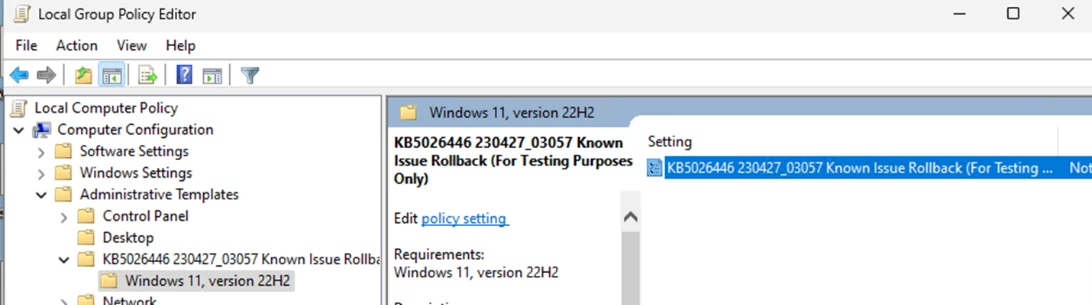
- Under Computer Configuration
- Then Administrative Templates
- Then KB5026446 230427_Known Issue Rollback (For Testing Purposes Only)
- Then Windows 11, version 22H2
- Double-click on the highlighted item.
- KB5026446 230427_03057 Known Issue Rollback (For Testing Purposes Only)
- Configure it as "Disabled"
- Select the Disabled bullet
- Then press Ok
- Reboot the machine and test ProSeries 2021 (and/or prior years).
- save client
- print client return/letter/invoice