
Level 5
December 20, 2023
Solved

updates to prior years proseries

  • December 20, 2023
  • 2 replies
  • 13 views

Apparently we have to update prior years proseries to current versions if we want to be able to sign in.   Is anyone having trouble logging in/signing in to pro series for years 2016, 2017 and 2018.   When I open those programs, to apply current updates, they do not open, and a get a blank white page instead of the typical user name and password fields to sign in.   I was able to open all other prior years and update to current versions, but not these years 2016, 2017, and 2018.   Seems odd.   Thank you.   Jeff Crossland 
This topic has been closed for replies.
Best answer by Just-Lisa-Now-

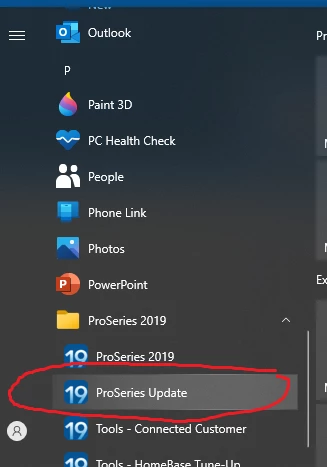
As mentioned previously, use the Windows Programs menu, each year has their own Update option listed below it

2 replies

Intuit Community Champion
December 20, 2023

Update from the windows menu, and do not open program you want to update.


Just-Lisa-Now-
Intuit Community Champion
December 20, 2023

As mentioned previously, use the Windows Programs menu, each year has their own Update option listed below it

♪♫•*¨*•.¸¸♥Lisa♥¸¸.•*¨*•♫♪


