
Level 7
April 16, 2026
Solved

The little refund number in bottom right corner is super-helpful for strategizing

  • April 16, 2026
  • 1 reply
  • 11 views

I love it so I can use a "what if I changed this number, how would it change the refund" in a split second. But in this client the refund keeps saying zero -- which is not correct, it $605. And it won't budge from the zero. Can I see where that little number in the right corner is based on?
Best answer by Just-Lisa-Now-

You cant just rely on the refund meter to show you what's happening you have to LOOK at the tax return itself, do the numbers makes sense, whats changing or not changing?

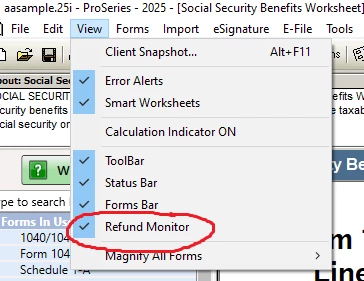
Ive personally never looked at the bottom corner number, if you turn on the refund monitor you can see it up in the top right corner, it changes to red if you have a  balance due, I think tis easier to see.


1 reply

Just-Lisa-Now-
Intuit Community Champion
April 16, 2026

You cant just rely on the refund meter to show you what's happening you have to LOOK at the tax return itself, do the numbers makes sense, whats changing or not changing?

Ive personally never looked at the bottom corner number, if you turn on the refund monitor you can see it up in the top right corner, it changes to red if you have a  balance due, I think tis easier to see.


♪♫•*¨*•.¸¸♥Lisa♥¸¸.•*¨*•♫♪
dd4vols
Intuit Community Champion
April 17, 2026

I'm like you @Just-Lisa-Now- , That's one of the very first things I do, when loading the new year's program....turning on the refund monitor. Until about 10 minutes ago, i had no idea here were itsy bitsy teeny weeny, amounts in the lower right corner.

If an answer solves your issue, click on the "Mark as Best Answer" button! Makes it easier for people to find answers to similar questions that have already been posted.


