


Just-Lisa-Now-
Intuit Community Champion
March 29, 2024
Question

That stupid little Action cannot be completed box that makes the program hang

  • March 29, 2024
  • 2 replies
  • 7 views

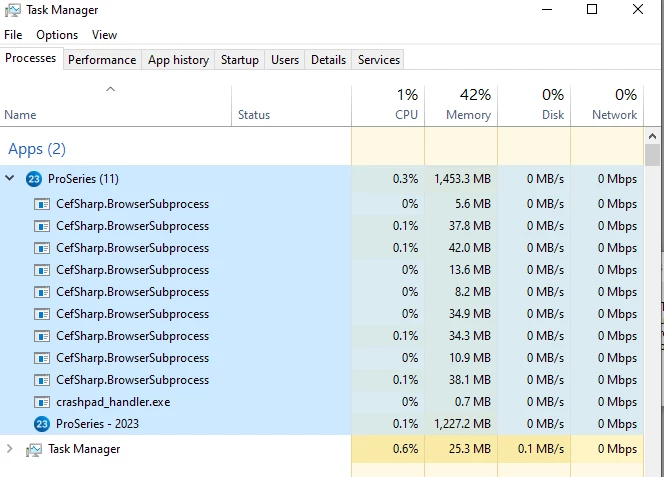
I usually only see it when Ive got other programs running, but this morning on a fresh reboot, only ProSeries 2023 was running, I get that little window, so I checked my Task Manager and I see a whole string of these, I used End Task on a few of them and the program finally freed up...this has to be a programming problem.  @1569  can we ask development why this is happening?
2 replies

March 30, 2024

Hi @Just-Lisa-Now-. Yes, let me see if I can get find additional information. Thanks! 

dkh
Level 15
March 30, 2024

QuickBooks does that CefSharp.BrowserSubprocess all the time.  Or at least on my computer it does.

Just-Lisa-Now-
Intuit Community Champion
March 30, 2024

@dkh wrote:

QuickBooks does that CefSharp.BrowserSubprocess all the time.  Or at least on my computer it does.


it just seems like something isnt programmed right if it has to load it that process so many times and the program hangs.  If I end task on several of the ones that have 0% next to them, then the program frees up.

♪♫•*¨*•.¸¸♥Lisa♥¸¸.•*¨*•♫♪
dkh
Level 15
March 30, 2024

I agree with you Lisa.   I've closed QBs many times because the number of those has been so high.

Lol....sad thing, I just chalk it up to being another Intuit issue and accept it.


