
Solved
Sign In to ProSeries Error & Transmission Error
When I open ProSeries and sign-in, I get a pop-up box that says:
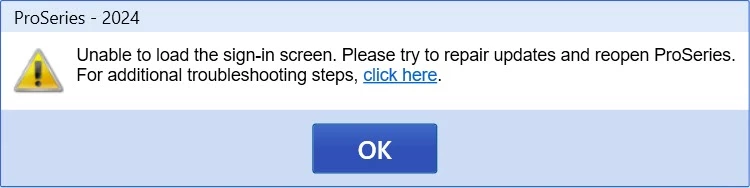
When I "click here" it says to do a clean install.
If I click OK, it opens ProSeries and all my clients are there. I have completed 2 clients and they have passed the error check and are ready to efile. One client only has a W-2 and the other has 1099-R and Social Security.
I went to efile and they passed the conversion but will not transmit. I've done the following:
- Removed my McAffee program. Just using Windows Defender as the firewall. Made sure *.intuit.com is a trusted site. No sites are restricted.
- Renamed my ProWin24 to ProWin24Old
- Downloaded the ProsSeries24 program
- Installed it.
- Ran the update.
- Confirmed address is correct for the firm (it was brought in from 2023 and hasn't changed).
- Clicked on the button that my PTIN is correct.
- Transferred my clients from 2023.
- Copied the 2 clients I had completed from the ProWin24Old/24Data to ProWin24/24Data
- Ran error check
- Went to EF View and click on EFNow.
- Transmitted. Passed Conversion but did not transmit. Log doesn't tell me why.
I've also cleared the cache from both my browser and the Program Browser.
I'm at a loss as to how to correct the trasmission problem. Hoping someone else has had this problem.





