
Level 1
March 19, 2023
Question

printing issue

  • March 19, 2023
  • 1 reply
  • 12 views

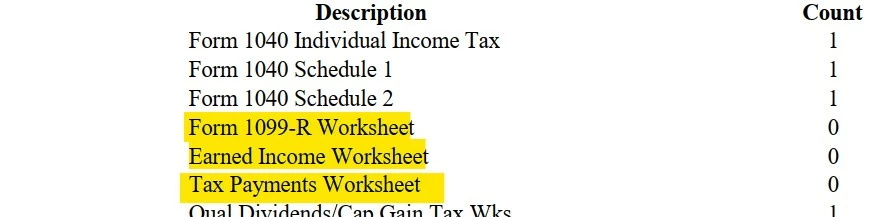
How do I get rid of the highlighted forms from printing on the invoice. I use Pro Series Basic,


This topic has been closed for replies.

1 reply

IntuitCharlene
Community Manager
March 24, 2023

To make those ones not show up: 

  1. Open the Client Specific Billing Options (The tab shows as "Client Bill")
  2. Scroll down to line 3 Per Form Charges. 
  3. Check box d "List only forms charged for in the return and include the charges" or e "List only forms charged for in return but do not include the charges" depending on if you want the amount your charging for that form to show up or not.   
  4. Anything with a 0 under "Count" should then not show up. 
**Say "Thanks" by clicking the thumb icon in a post**Mark the post that answers your question by clicking on "Accept as solution" and then just changing the Accept as solution to Mark as Best Answer, mine gets cutoff, so it is too long. I changed mine to the following and it fits. -->**Say "Thanks" by clicking the thumb icon in a post**Click "Mark as Best Answer " to mark the post that answers your question.


