

HOPE2
Level 7
March 5, 2025
Solved

HOME OFFICE DEPRECIATION

  • March 5, 2025
  • 3 replies
  • 20 views

Hi everyone. I really need help.

A client moved to VA from CA around October 2024 and has two W-2 forms: one from CA and the other from VA. For 2023, she had a deduction for her own office expense. As of January 1, 2024, she is no longer using her home office in CA, as she used to be self-employed in 2023.

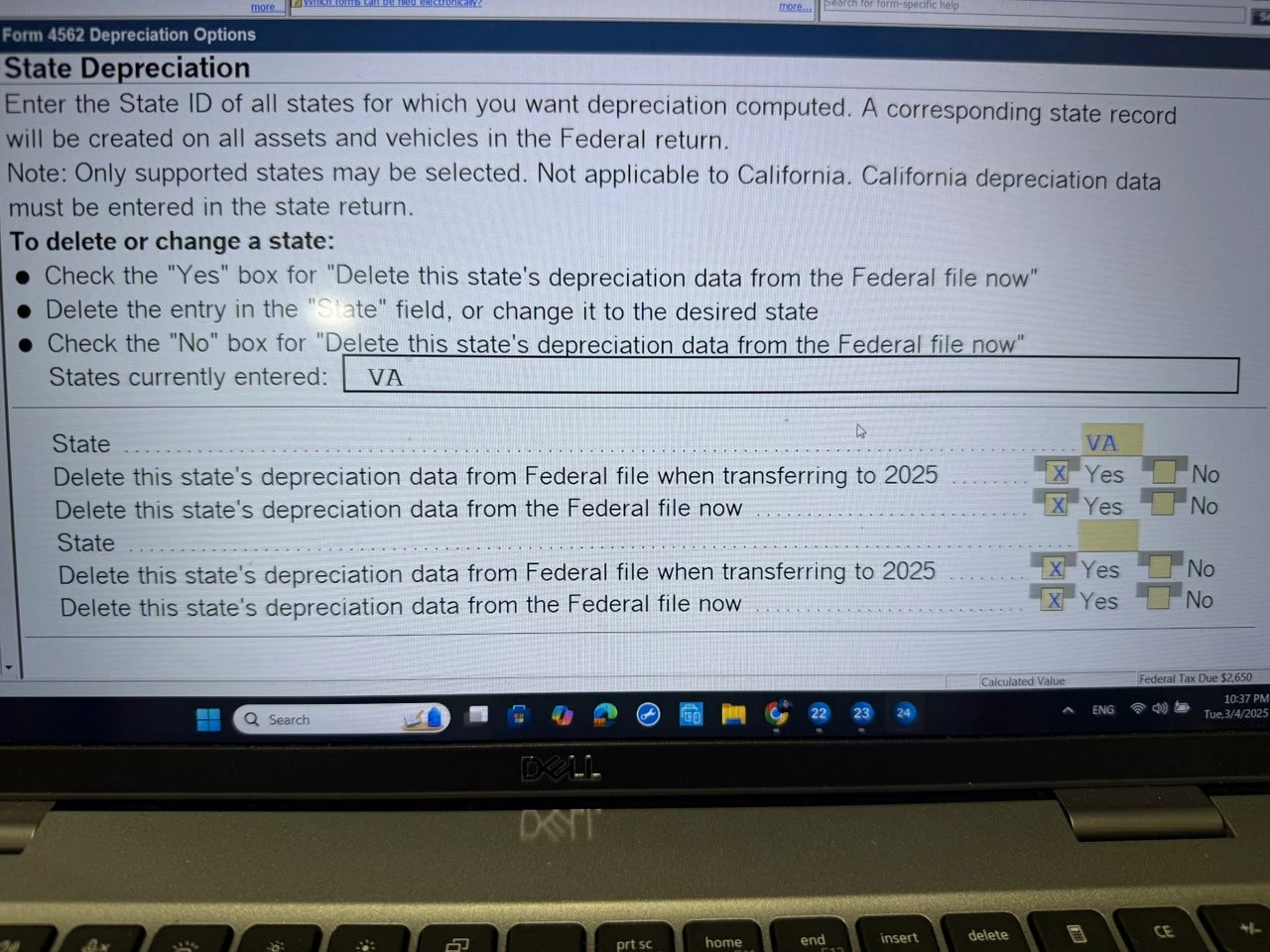
Now, I entered the "Date of Disposition" as January 1, 2024, on Form 8828, Asset Entry Worksheet. In the middle of this form, we have the "State Depreciation" section. When I click on QuickZoom in front of "Select or Delete State," it takes me to the "Depreciation Option" sheet, and I see the attached picture. She moved permanently to VA, so should I mark it as shown in the picture? 

question : If I entered the date of disposition on federal part that would be ok for stopping DEP on FED and CA?

Thanks for help.


This topic has been closed for replies.
Best answer by TaxGuyBill

Thanks @TaxGuyBill the only client have had for 2023 on schedule C (8829)  it was depreciation of the occupied part of the house regarding home office so what should I do?

Sorry am asking you again, I always feel cooler in the middle of tax season!


I don't quite understand your last comment, but as I said before, if there is no business, delete Schedule C and everything attached to it.

If there is still a business, just delete the Asset Entry Worksheet if the office was not used.

3 replies

GodFather
Intuit Community Champion
March 5, 2025

I think the way you have the form filled out, it would remove Virginia information.  If I read the post correctly, the client moved from California to Virginia.  Maybe the state entered should reflect CA instead of VA?

Intuit Community Champion
March 5, 2025

You should put date stopped using 12/31/2023, and not 2024

HOPE2
HOPE2Author
Level 7
March 5, 2025

Thanks@ Terry53029 , I tried to put 12/31/2023, but a red diagnostic popped up

Level 15
March 5, 2025

If the office was not used in 2024, delete it. 

It probably should have been reported as ending on last year's tax return.

IRonMaN
Level 15
March 5, 2025

But I'm curious.  If you are looking at a depreciation schedule for a home office and she moved, whatever happened to the home the office was in?

Slava Ukraini!
HOPE2
HOPE2Author
Level 7
March 5, 2025

I want to stop the depreciation since she is no longer self-employed. The software shows the amount of depreciation but no income from self-employment anymore. My goal is to ensure the IRS knows not to continue calculating depreciation on their side.


