
Level 3
September 6, 2024
Solved

Firm / Preparer Information Disappears - my case number is:

  • September 6, 2024
  • 3 replies
  • 21 views

Is anyone else having issues with the firm/preparing information not saving and disappearing when going into other returns....and even happens when I open up a state in the same file...the firm/preparer information disappears.  I have called tech support with no help.....

can I get in touch with a ProSeries engineer on this issue.   Thanks!
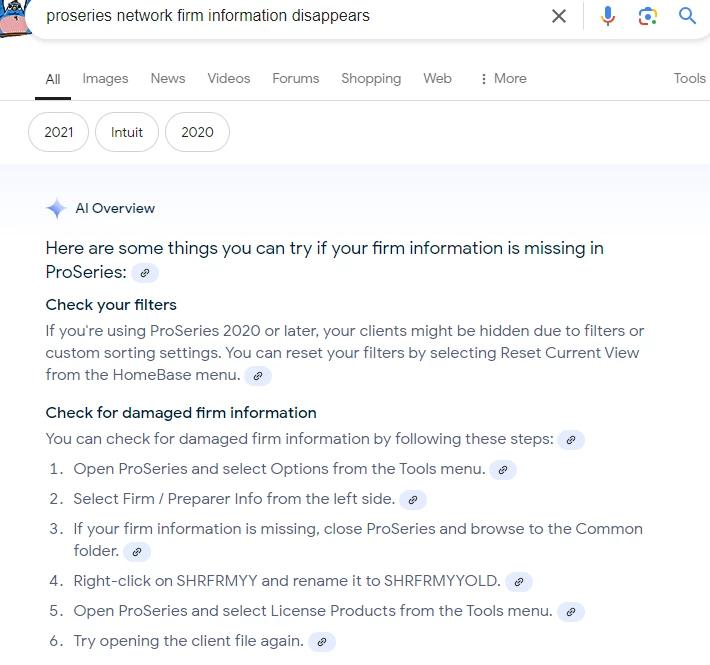
Best answer by Just-Lisa-Now-

google gave me this

3 replies

Just-Lisa-Now-
Intuit Community Champion
September 6, 2024

google gave me this

♪♫•*¨*•.¸¸♥Lisa♥¸¸.•*¨*•♫♪
rgarganiAuthor
Level 3
September 6, 2024

Thank you soooooo much.... that fixed it.... you have made by week/month!! 


sjrcpa
Level 15
September 6, 2024

Too bad Support didn't know that.

The more I know the more I don’t know.
sjrcpa
Level 15
September 6, 2024
rgarganiAuthor
Level 3
September 6, 2024

actually it did....  Lisa got it to work....after HOURS with Proseries.

George4Tacks
Level 15
April 30, 2025

ACTUALLY it looks like Lisa got the answer by using Google Chrome AI to get the solution.

The real question, in my mind, is why doesn't a search on this site find that information? Searching the "Community" is an exercise in futility. 

Answers are easy. Questions are hard!
Level 2
March 18, 2026

Our firms preparers also keep appearing and disappearing randomly.  We cannot e-file without this information.  What is happening to fix this?

Moderator
March 19, 2026

Hi @JaneLee,  We know how frustrating it is when things don’t work as expected.


We will need you to reach out to our Support team directly so they can better assist you.  Since this community is designed for peer-to-peer resource sharing, our technical team doesn't monitor these threads for troubleshooting.


Our support specialists need a formal ticket to actually investigate the behavior you're seeing. They have the tools to determine if it’s a quick fix, a change in instructions, or a potential defect and whether it’s one we’re already reviewing or a brand-new issue we need to get reported.

Reporting it through the proper channel ensures your specific case gets documented and addressed by the people who can fix it.


