
Level 5
March 4, 2025
Solved

Exclusion Code for New York state returns

  • March 4, 2025
  • 1 reply
  • 13 views

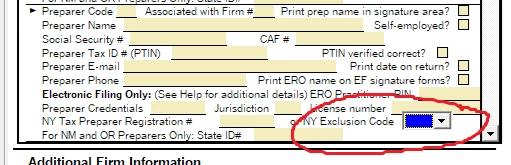
I have an Error code on the only New York state return that I do. There's a change that requires me to enter a NYTPRIN exclusion code for the preparers sig box. I have no idea where I find this and what it is. Can someone help me to complete this return?
Best answer by Just-Lisa-Now-

In  Tools > options > Firm/Preparer Info > Preparer Information  you dont get the drop down menu on that line for NY info?

1 reply

Just-Lisa-Now-
Intuit Community Champion
March 4, 2025

Do you have a NY Preparer Registration number?   or are you excluded with one of these codes?  You choose the exclusion code in the Firm/Preparer info section of Tools > Options

♪♫•*¨*•.¸¸♥Lisa♥¸¸.•*¨*•♫♪
Level 5
March 4, 2025

Thanks for your reply Lisa.

My problem is that I don't get that list of exception codes when I click on the drop down for Exclusion codes. I just get Firm/Prepare info box. How do I get to the drop down code list?

Just-Lisa-Now-
Intuit Community Champion
March 4, 2025

In  Tools > options > Firm/Preparer Info > Preparer Information  you dont get the drop down menu on that line for NY info?

♪♫•*¨*•.¸¸♥Lisa♥¸¸.•*¨*•♫♪


