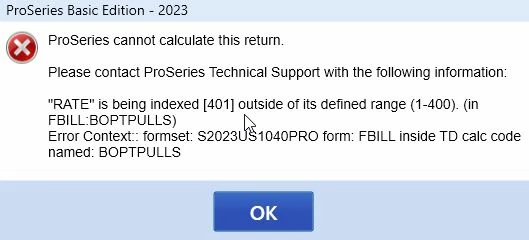
@TaxGuyBill Try these steps if you haven't already:
1. Transfer prior-year preparer information and billing invoice operations to the current year. (See the third blue expando in How to use Client Billing Options in ProSeries)
2. Rename client in HomeBase. In ProSeries Professional and ProSeries Basic you can rename a client file from within the HomeBase. (From Help Article: Managing your client list)
- In HomeBase, highlight the client file you wish to rename.
-
From the File menu, select Client File Maintenance and choose Rename.
- Enter the new client file name.
- Click Rename Client.
- Enter the new name.
3. Restart your software
If this solution doesn't remove the popup, let me know by responding and I'll continue to research.
@1569
I figured it out.
I use the billing rates-per-form. In Basic, I have several 'add on' ones that I manually check for various options (such as a PITA fee).
The 2023 program automatically transfers that from year to year However, the 2023 program is screwing up those 'add on' entries on the rates-per-form page (I don't have those add-on items in Professional, which is why Professional has been working).
I couldn't figure out out to directly delete the forms-per-rate information (deleting the SHRFRM files wasn't doing it). So I had to delete those 'add on' items from my 2022 software (which screws up my 2022 billing information), then do a "clean" install of 2023.
So while I have it figured out, the initial problem is that the developers screwed something up for those 'add-on' items for the billing-per-form. So while it may not be common, there will likely be other complaints about the program error.
Thanks for looking into it. Can you report to the developers and support about this problem that they screwed up? At least that way there is a record of the problem for when others call to complain.