
Level 2
July 5, 2025
Solved

Why is my insurance reimbursement for a casualty loss showing as a capital gain on Form 1040, line 7 in ProConnect?

  • July 5, 2025
  • 1 reply
  • 7 views

I’m entering a federally declared disaster loss (hurricane) for a client’s personal residence in ProConnect. The FMV before loss is $152,000, FMV after is $122,000, insurance reimbursement is $20,000, and amount paid for repairs is $30,000. However, there is no visible field to enter the property’s cost or adjusted basis (which is $125,000). After entering all information in the 4684 input area, ProConnect is putting $20,000 on Form 1040, line 7 (capital gain/loss), instead of carrying the casualty loss to Schedule A. I double-checked that the event is not entered on Schedule D or as an asset sale. Where or how should I enter the cost basis for the casualty loss? Is this a software bug or am I missing a step? How do I get ProConnect to treat this as a casualty loss deduction instead of a capital gain?
Best answer by George4Tacks

Here are the meager instructions from ProConnect https://accountants.intuit.com/support/en-us/help-article/federal-taxes/entering-personal-casualty-loss-deductions/L3VWnG1m7_US_en_US?uid=mcrps4cb$srcG4Tf

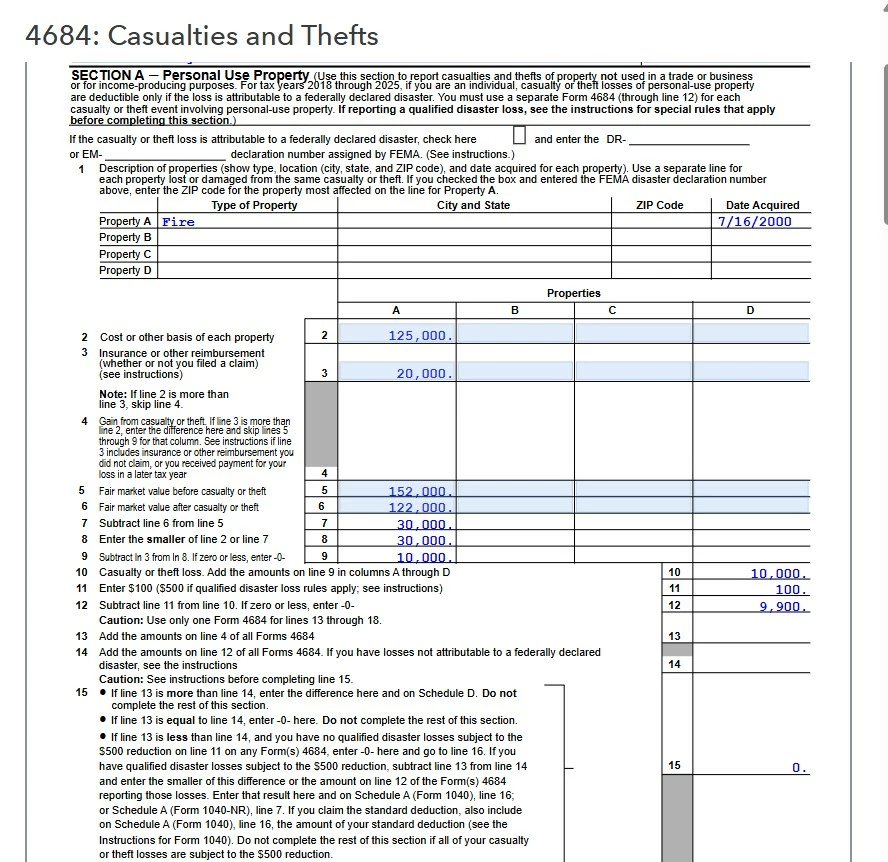
If you did that, what does your 4684 look like? I have this, but only after a "fix" 


Line 2 was blank, so I clicked on the blue area (neat feature in ProConnect) and it jumped to the input for cost basis. 


1 reply

George4Tacks
Level 15
July 6, 2025

Here are the meager instructions from ProConnect https://accountants.intuit.com/support/en-us/help-article/federal-taxes/entering-personal-casualty-loss-deductions/L3VWnG1m7_US_en_US?uid=mcrps4cb$srcG4Tf

If you did that, what does your 4684 look like? I have this, but only after a "fix" 


Line 2 was blank, so I clicked on the blue area (neat feature in ProConnect) and it jumped to the input for cost basis. 


Answers are easy. Questions are hard!
Level 2
July 7, 2025

Thank you so much for your guidance!
I was finally able to enter the cost basis by clicking on the blue area in the return preview, as you suggested. However, I want to mention that it was quite difficult to discover this step, since the cost basis field is located on a completely different input screen (see attached screenshot). It’s not at all intuitive that you have to go to the “1099-B proceeds from broker and barter exchange transaction” section under General Information to enter the property’s cost basis for a casualty loss.
If anyone else is struggling with this:

  • Click on the blue amount or line number in the return preview (Line 2 or wherever the error is) and ProConnect will jump directly to the correct data entry screen.

  • Then, enter your cost basis under the “Cost or other basis” field (in my case, $125,000).

After doing this, the return calculated correctly and the capital gain issue was resolved. Thanks again for your clear instructions and for saving me a lot of time!


