

Solved
ProConnect How to enter Maryland Form 502 505
Clients have four estimate quarter MD state tax vouchers https://www.marylandtaxes.gov/forms/current_forms/PV.pdf
How to enter them in ProConnect? Thank you!
Clients have four estimate quarter MD state tax vouchers https://www.marylandtaxes.gov/forms/current_forms/PV.pdf
How to enter them in ProConnect? Thank you!
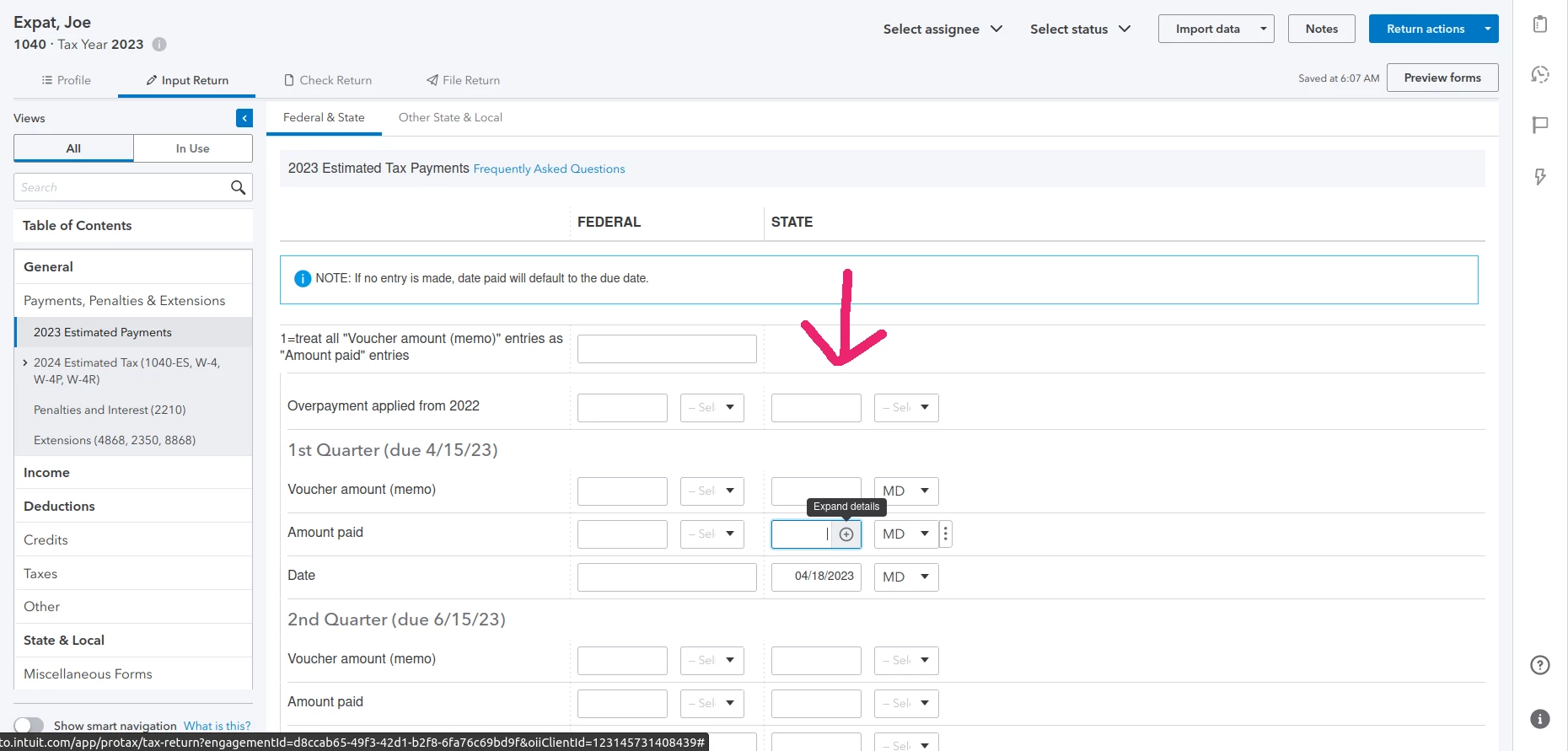
You enter the details for ES-tax payments under General > 2023 Estimated Payments. This is the input screen you use for both federal and state payments.
If your client has multiple states or had made multiple ES-tax payments for the same quarter on different dates, you can click on the + sign on the right of the field (where you see Expand Details prompt in the screenshot below) to open the pop-up that will allow you to make entries on multiple lines.
Enter your E-mail address. We'll send you an e-mail with instructions to reset your password.





