
Level 2
January 27, 2025
Solved

print message at the top of Form 1040 page 1

  • January 27, 2025
  • 1 reply
  • 6 views

Where do I input a message to print at the top of Form 1040, page 1?

    This topic has been closed for replies.
    Best answer by George4Tacks

    A quick way to find many input spots is in looking at the form.

    Look at the 1040 and move the mouse up to the top of the form.  You should see a large check mark, RIGHT CLICK and select Jump to Input

    In this case it just takes you to the Date of Death which in there if the client died.

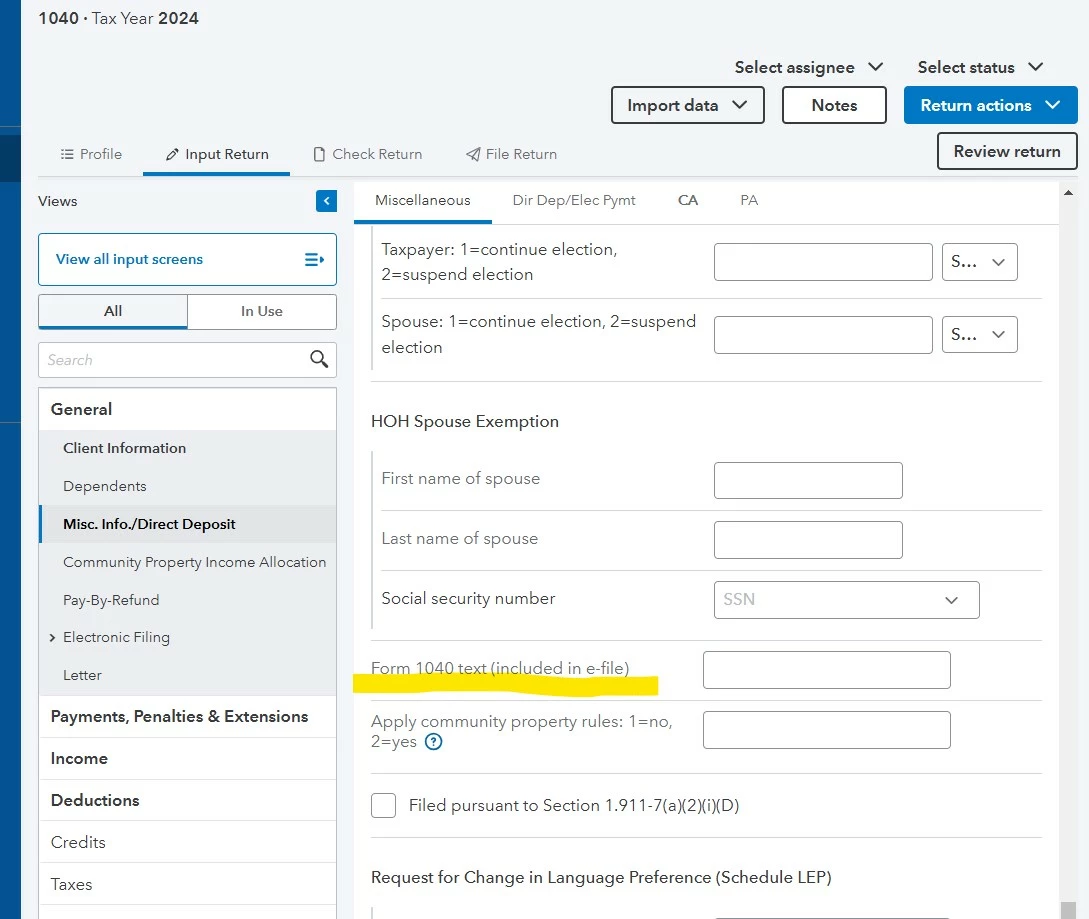
    Here is a link to the how to for Lacerte and the corresponding image for PROCONNECT (I just edited, cuz I had the wrong software question)


    1 reply

    IRonMaN
    Level 15
    January 27, 2025

    What message are you trying to type?

    Slava Ukraini!
    trmaharAuthor
    Level 2
    January 27, 2025

    Thank you for the message.

    I want to add a brief note that the taxpayer is filing their 2023 return in January of 2025 due to IRS relief granted to Vermont residents because of flooding.

    George4Tacks
    Level 15
    January 27, 2025

    A quick way to find many input spots is in looking at the form.

    Look at the 1040 and move the mouse up to the top of the form.  You should see a large check mark, RIGHT CLICK and select Jump to Input

    In this case it just takes you to the Date of Death which in there if the client died.

    Here is a link to the how to for Lacerte and the corresponding image for PROCONNECT (I just edited, cuz I had the wrong software question)


    Answers are easy. Questions are hard!


