
Level 3
February 24, 2021
Solved

How to fix Estimate Tax Worksheet number?
  • February 24, 2021
  • 1 reply
  • 33 views


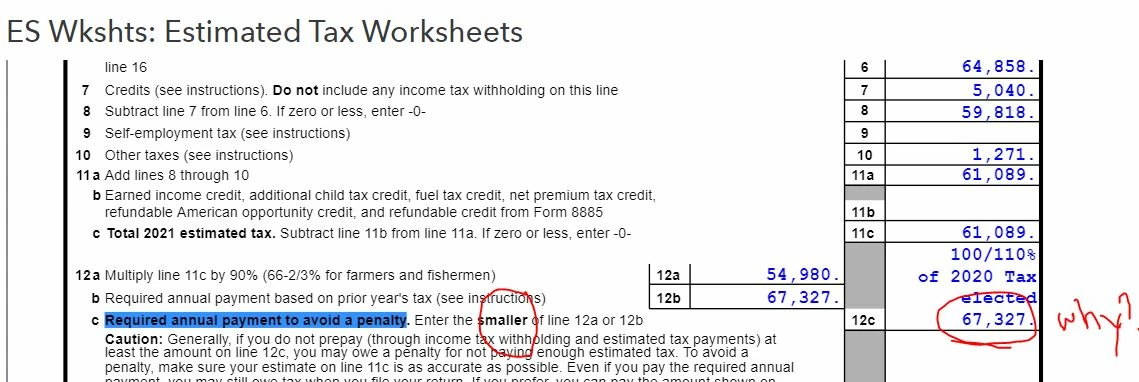
12c number should be the smaller of line 12a or 12b.

But the bigger number(12b) was auto selected, resulting in Estimate

How can I fix it?

This topic has been closed for replies.
Best answer by itonewbie

That's because you've overridden the option for Payments & Penalties > 2021 Estimated Tax (1040-ES) > Estimate options [O] with option 3=Greater of 90% of 2021 or 100/110% of 2020 tax.  The one you should select is 2=Lesser of 90% of 2021 or 100/110% of 2020 tax.  I'm assuming you are pretty certain your client will have a lower liability this year.

1 reply

itonewbie
itonewbieAnswer
Level 15
February 24, 2021

That's because you've overridden the option for Payments & Penalties > 2021 Estimated Tax (1040-ES) > Estimate options [O] with option 3=Greater of 90% of 2021 or 100/110% of 2020 tax.  The one you should select is 2=Lesser of 90% of 2021 or 100/110% of 2020 tax.  I'm assuming you are pretty certain your client will have a lower liability this year.

---------------------------------------------------------------------------------Still an AllStar
itonewbie
Level 15
February 24, 2021

Given the uncertainties around tax law changes, adjustments for future installments may be necessary if you really don't want to use the ol' trusted prior year exception.

---------------------------------------------------------------------------------Still an AllStar
JayeAuthor
Level 3
February 24, 2021

Thank you for your advice.

I fixed the federal option to 2=Lesser of 90% of 2021 or 100/110% of 2020 tax and if fixed!!! 

Yes, I'm quite certain my client would not need estimated tax payment because he set much higher withholding amount from his W2 this year.


May I ask what is the right option for CA?

And what is "the ol' trusted prior year exception"?


