
Level 3
March 8, 2021
Solved

Depreciation not flowing from form 4562 to for 1065

  • March 8, 2021
  • 1 reply
  • 11 views

I have regular depreciation on form 4562 part III.The total is correctly showing up on Line 22. This amount is not flowing over to 1065 line 16a. This field is blank. On top of that the depreciation amount is showing up on K1 as separately state item in Box 13 (other deductions) as special allocated depreciation. While entering the form 4562, I have opted out of Special depreciation allowance. This is a simple scenario

Is that a product bug or i am doing something wrong?
This topic has been closed for replies.
Best answer by PhoebeRoberts

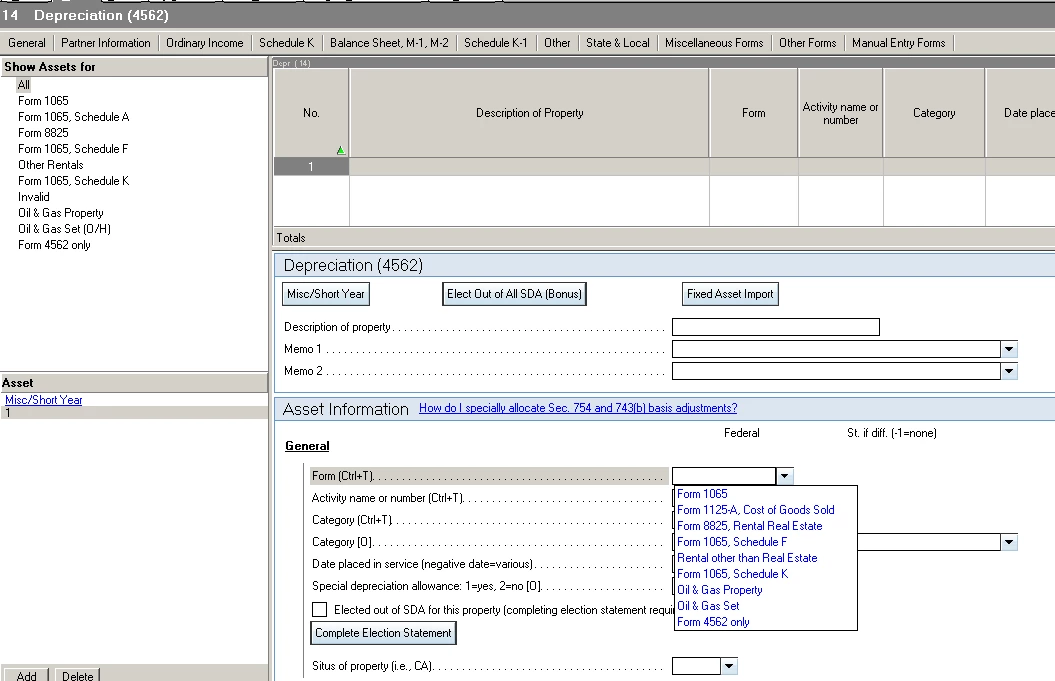
This is a screenshot from Lacerte, so you're going to have to work by analogy, but they generally work the same way.

Where you select the Form, pick Form 1065, not Form 1065, Schedule K.

1 reply

PhoebeRoberts
Intuit Community Champion
March 9, 2021

This is a screenshot from Lacerte, so you're going to have to work by analogy, but they generally work the same way.

Where you select the Form, pick Form 1065, not Form 1065, Schedule K.

aaroraAuthor
Level 3
March 9, 2021

It worked!. Thanks a ton. In which scenarios should the option of Form 1065 & K1 be selected?


