
Level 3
January 29, 2021
Solved

CA Depreciation Schedule - Not Showing PY Depreciation (CA Schedule B - 100S)

  • January 29, 2021
  • 2 replies
  • 14 views

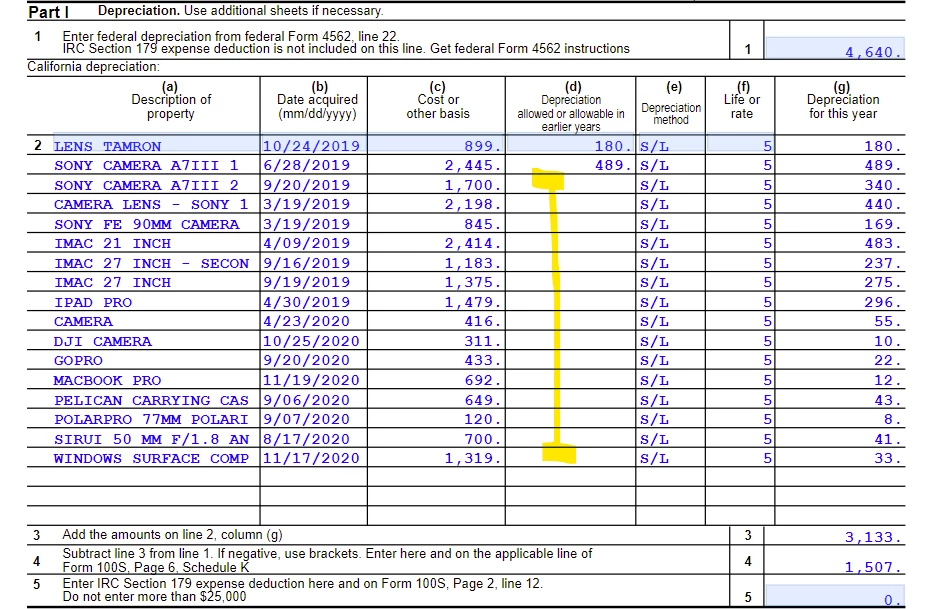
Prior year state depreciation is entered in the Quick Entry screen for all assets; however, the prior year figures for only two of the assets are appearing on CA Schedule B (100S)


I don't know why this is the case or how to fix it. Please help if you're familiar with this.
 

This topic has been closed for replies.
Best answer by mobilestranger21

Well, after 3 hours and 12 mins. on chat support, I got the answer. Multi-state return needs to be selected (even though it's not a multi-state return) and then in the state column, you have to select CA for it to flow. 

2 replies

George4Tacks
Level 15
January 29, 2021
Can you post a screen of the quick entry? Especially the right side of the grid?
Answers are easy. Questions are hard!
Level 3
January 29, 2021

Yes sure.


Screenshot with cost of $899 is an example for an asset that appears correctly on the CA Depreciation Schedule.

Screenshot with cost of $1,700 is an example for an asset that does not appear correctly on the CA Depreciation Schedule.


George4Tacks
Level 15
January 29, 2021

I think you should click the Live Chat and have support look at your return to help.


Answers are easy. Questions are hard!
mobilestranger21AuthorAnswer
Level 3
January 29, 2021

Well, after 3 hours and 12 mins. on chat support, I got the answer. Multi-state return needs to be selected (even though it's not a multi-state return) and then in the state column, you have to select CA for it to flow. 

George4Tacks
Level 15
January 29, 2021

You are doing federal and CA only? Are there out of state shareholders? Sorry it took so long, support seems to be lagging on all products this year.

Thank you for posting a "solution"


Answers are easy. Questions are hard!


