
Level 4
December 21, 2020
Solved

Profile T1: Events Table and Correction Module#

  • December 21, 2020
  • 2 replies
  • 13 views

Hello,


Using Profile-T1 (version 2020.2.0):


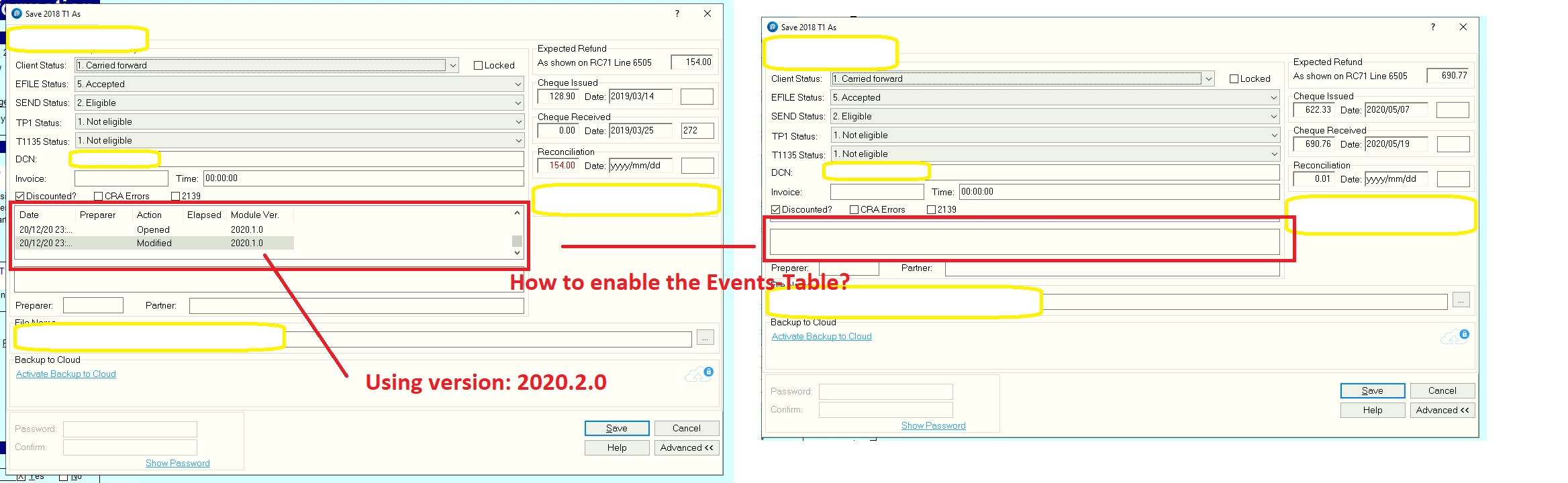
1. Under "Save-As", how to enable the Events-Table (columns: Date, Preparer, Action, Elapsed, Module) for all returns and every year (pls see attached screen-shot)?


2. Why is the correct module/version# not displayed (pls see attached screen-shot)?


Thanks.

This topic has been closed for replies.
Best answer by Michel-Pothier

You need to bring you mouse on the upper ou the lower line and drag this line up or down. This will make the window longer and you will be able to see the events.

2 replies

Level 6
December 21, 2020

You need to bring you mouse on the upper ou the lower line and drag this line up or down. This will make the window longer and you will be able to see the events.

Level 8
December 21, 2020

Hi, thank you for using Intuit ProFile Community

The answer is correct. You need to expand the section in the properties window: all properties are automatically populated.

Hope this helps


