
Level 1
November 29, 2022
Solved

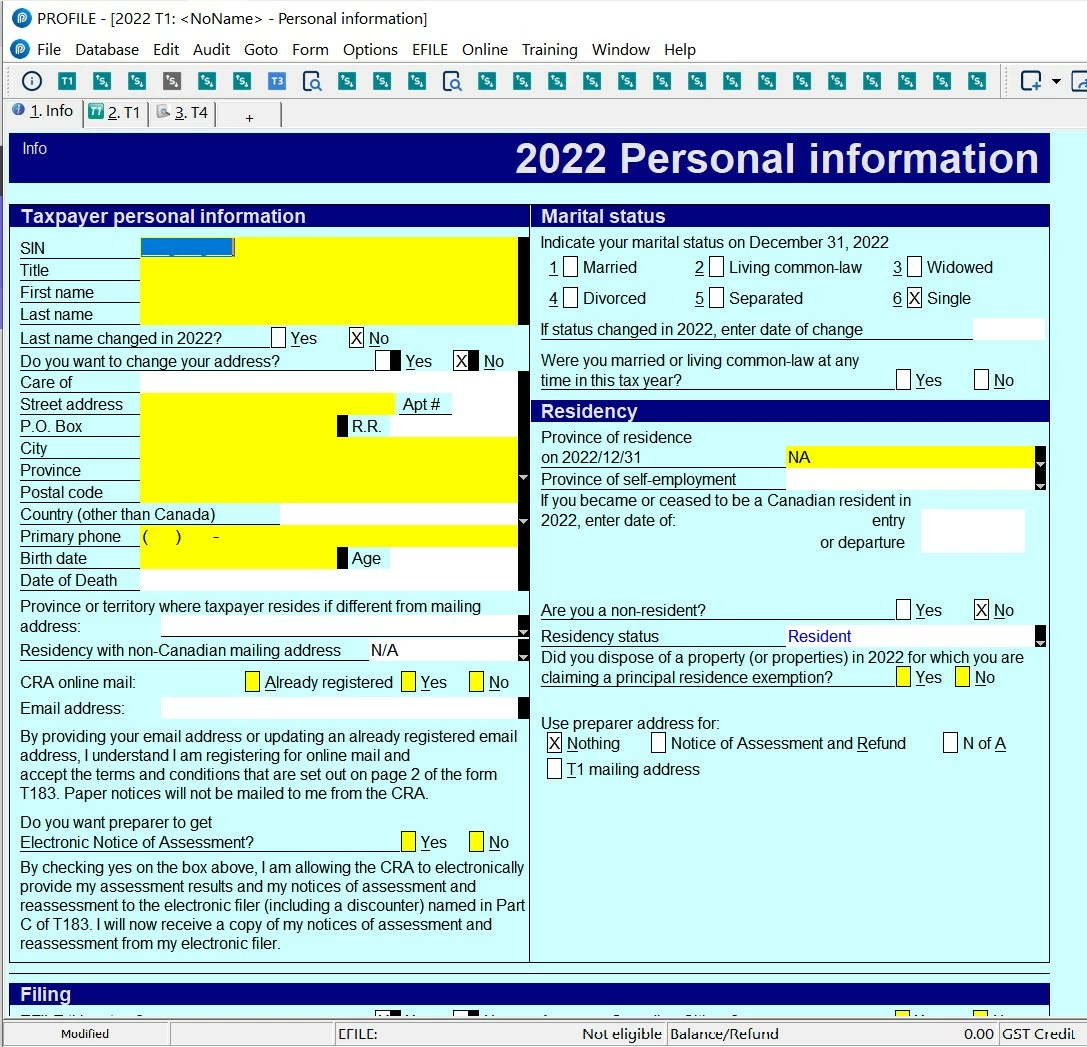
Forms toolbar only shows "+" instead of form title

  • November 29, 2022
  • 3 replies
  • 11 views

After the most recent update to Profile, my forms toolbar is no longer functioning properly. The links are still there if the button is pressed but the buttons only have a "+" symbol rather than the name of the form. This is occurring in both the T1 and T2 modules. 


Adding new buttons (or trying to replace the old ones with the same form) does not resolve the problem. 
This topic has been closed for replies.
Best answer by Pro4

Attached is the screen shot of this...


Hi

If you are on ProFile version 2022.2.0 , right click in the forms toolbar and click on Show captions. Hope this helps

3 replies

Level 5
November 29, 2022

With this update, the majority of my T1 & T2 file shortcut icons on ALL YEARS show this "+" look attached too, even with "Show Captions" on. Please show us quick how to fix this.

Level 5
December 3, 2022

Are these only our issues in Windows 10 Pro? Any suggestion to restore the icon look back?

Level 8
December 7, 2022

Hi, 

This ProFile error will be resolved in ProFile version 2022.2.0 due for release mid December. The toolbar icons should not display as a +. There should be no change to icon display and function from previous year. We will resolve this issue soon.

I apologize for the inconvenience

Level 5
December 16, 2022

V2022.2 now changes my T1 & T2 shortcut icons' + to an useless 's,!!!

Level 8
December 19, 2022

Hi,

ProFile version 2022.2.0, now available for download, has corrected the display of form toolbar icons. 

I apologize for the inconvenience 

Level 5
February 12, 2023
GarryP, if you've fixed the shortcut icon issue, please show me how in V2022.2.5. Thx.
Level 5
February 18, 2023

No such fix on V2022.3 still.

Level 8
February 20, 2023

Hi,

The design team is working on a fix for ProFile 2022.4.0, due for release the end of March.

I apologize for the inconvenience.


