
Level 3
January 14, 2026
Solved

With the changes to the Form 1065 8825, what is the Lacerte workaround to input state income taxes on the 8825?

  • January 14, 2026
  • 5 replies
  • 27 views

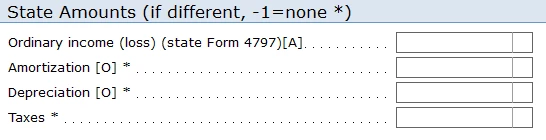
On the 2025 1065 Form 8825, the line for "Taxes" has changed to "Real Estate Taxes". Prior to 2025, I was including the property taxes, California LLC Tax, and any California PTE Tax on the "Taxes" line and then using the "State Amounts (if different)" to remove the California state taxes from the California 8825. Then on the M-1, I would enter the CA LLC Tax + CA PTE Tax on the line "State Tax" under non-deductible expenses. I would be in balance for both Fed and State.

Now with the changes to the 8825, I'm trying to find a workaround since I no longer feel comfortable entering the State taxes on the "Real Estate Taxes" line. If I enter the state income taxes on the line "Other expenses", how can I properly remove the expense on the California 8825? I do not want to enter the expense as an ordinary deduction on Page 1 of the 1065 and I'd like to avoid using Line 13e to separately state the income tax deduction.

I know it's still very early in the year, but it would be great if Lacerte can reorganize the 8825 input and include a separate line for "Taxes" and "Real Estate Taxes" on the 8825 input and then we can continue to use the State Amount (if different) box to remove the state income tax from the California 8825.


Best answer by Neil Gulati

Well, unfortunately, we just got the Lacerte update a few minutes ago, and this problem still has not yet been fixed.  Very disappointing.


Lacerte has got a Fix for Partnership returns now. Thanks.


Hope a fix is coming soon for S. Corp. returns as well.

5 replies

Level 4
January 21, 2026

I just got the latest version of lacerte downloaded from Lacerte and, shockingly, this still hasn't been fixed.  Not sure why this is so difficult to fix.  Easiest thing for Lacerte to do is just use last year's (ie 2024) program coding which actually worked.

Kathi_at_Intuit
Moderator
January 23, 2026

Hi @radio4 Nice to see you in the Community and thanks for posting about the 1065 8825. Development is looking into this and for now, the other taxes can be entered under "Other expenses".

**Click the 👍Thumbs up icon to say thanks on a post, and click Best Answer to mark the post that answered your question.
Level 4
January 23, 2026

Hi Kathi@intuit.

thanks for replying regarding the 8825 problem, but entering taxes into "other expenses" won't solve the problem because the "other expenses" section of the program doesn't contain a "state if different" field.  So, without a "state if different" field for taxes, we can't finish the tax returns (for any state tax return).

Please have Lacerte's Development Team address this asap.

thank you, 


Kathi_at_Intuit
Moderator
January 23, 2026

Hi @bwcpa Thanks for the reply and feedback. We have given it to development for review. 

**Click the 👍Thumbs up icon to say thanks on a post, and click Best Answer to mark the post that answered your question.
Level 2
January 27, 2026

It's no longer early in the season as we have four partnerships with rentals ready to go, but we cannot file and include the state taxes in real estate taxes.  That does not make sense, but that is where you have to put it if you want a State if different adjustment.   Why the change and when is this going to be corrected.

Level 4
January 27, 2026

Awfully slow development team at Lacerte this year.  I wonder if UltraTax can get it right.

Level 3
January 27, 2026

Hi Kathy:

Would like to know if there is going to be a fix or not for this issue or not as in light of filing season already started. At lease give us an update on this from the Development team.


Level 2
January 28, 2026

I would just use the "other expenses" section at the bottom of the 8825 input screen to enter the state taxes.  Then in the M-1 screen you will enter the state tax adjustment like you normally do.  Everything will balance.

Jeff Heimler, CPA

Level 4
January 28, 2026

No, we tried that already, and you'll notice that if you do that, your California Schedule M-1 will have the wrong number for income per books. (it will be off by the amount of California non deductible PTE taxes).


Also, California requires their own version of the Form 8825, using California law amounts, and if you put the pte taxes in "other expenses" the program will incorrectly deduct the PTE taxes on the California 8825, which is definitely wrong.

Level 3
January 28, 2026

Fully Agree with bwcpa. The fix will require a line item for State Taxes, similar to the line provided  for State Taxes in the Page 1, 1065 deductions (Ordinary Business income and expenses).

Level 2
February 4, 2026

If I enter real estate taxes on the real estate tax line on the 8825 it doesn't flow to the Pa Schdule E.  It shows it as out of state source loss? 

IntuitKatie
Moderator
February 5, 2026

Hi @kile 

Thanks for being here on the Community! If this is still an issue we would recommend contacting Lacerte Support for further assistance.

Level 3
February 6, 2026

Hi Katie


Just FYI, I still haven't see the fix on the S. Corp. return module. Hope it comes soon with this week's update.


