
Level 4
March 27, 2026
Solved

Tax return copy Print Settings

  • March 27, 2026
  • 1 reply
  • 9 views

Hi, all,

When printing a tax return, I am accustomed to seeing three boxes checked... preparer copy, client copy, and government copy. For 2025, only preparer review copy is checked. I can uncheck it and check the other three every time I print a return, but I can't find the global setting to tell Lacerte to check only those three by default. Can someone show me where that setting is? I can't find it in Settings, Options, Items to print, other than checking and unchecking all the boxes for the various categories, which I have never done before and does seem like it would do what I want anyway.

Thanks,

Michael
Best answer by George4Tacks

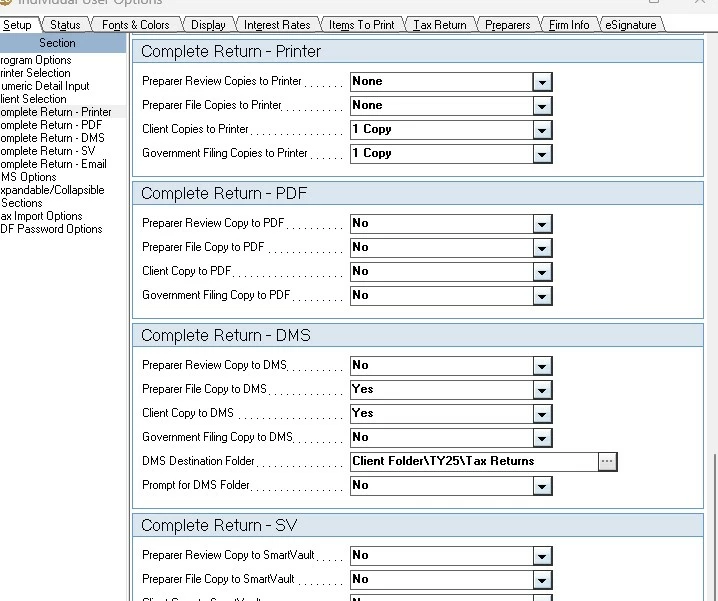
Setting > Options > Setup > Complete Return - various options , select number of each type to print for complete return. 

Here is an example

1 reply

George4Tacks
Level 15
March 27, 2026

Setting > Options > Setup > Complete Return - various options , select number of each type to print for complete return. 

Here is an example

Answers are easy. Questions are hard!
mhlesterAuthor
Level 4
March 27, 2026

Thank you... that is exactly what I was looking for, and this is the first year I forgot where it was!

George4Tacks
Level 15
March 28, 2026

I also forgot. I am retired so I have more time to search and find. I am glad it helped.

Answers are easy. Questions are hard!


