Level 2
December 18, 2020
Solved

Schedule C

  • December 18, 2020
  • 2 replies
  • 29 views

I'm entering in vehicle info for business use of a vehicle with the year, make, model and mileage but I CANNOT get the information to carry over onto the P & L. It's driving me nuts! I've entered the data into Screen 22 but when I view the form, the Sched C, Part IV is BLANK. Can someone please assist me? I'm new to the Lacerte program and I'm practicing on Lacerte 2020 before Tax Season starts. ANY suggestions are welcome! Thanks a million!

This topic has been closed for replies.
Best answer by George4Tacks

I go from Contents -> 22 Depreciation OR do I go from Contents ->23 Direct Input OR should it be Contents ->30 Vehicle/Emp. Bus. Expense (2106)?  If it's 22 Depreciation-under General, the Form should be Schedule C, correct? Then enter the asset information along with the Date placed in Service and THEN scroll down to Automobiles and Other Listed Property?  I believe I'm missing something somewhere because it shouldn't be this complicated to enter a vehicle used for business that should show up on Part IV of the P & L...  I'm glad I know what a P&L is supposed to look like or I would be lost...


General rule for Lacerte - NEVER USE direct input - NEVER USE Override [O] - There are a few rare exceptions

If you are ONLY USING MILEAGE, use 30 and be sure Form Number (Ctrl + T) is set to Schedule C and the Activity is tied to the specific Schedule  C

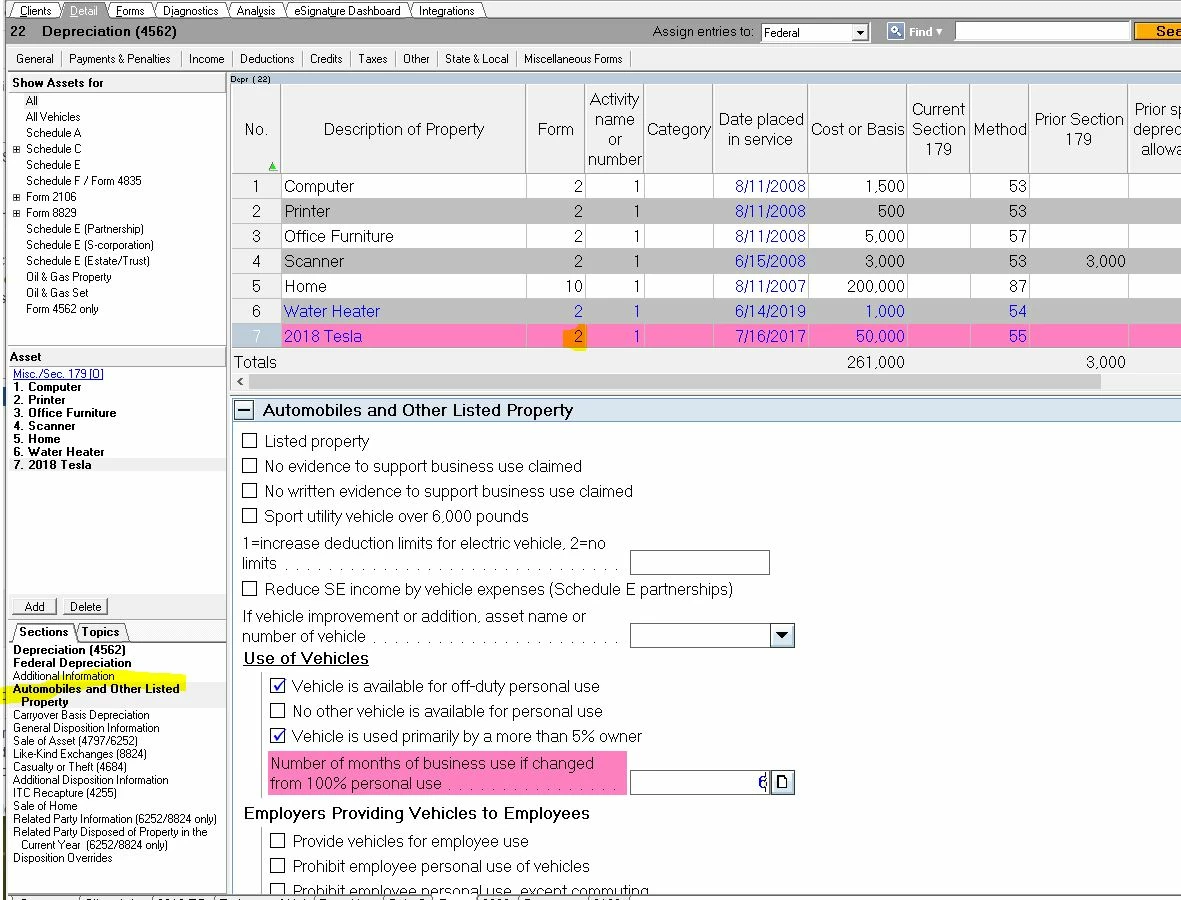
If you are depreciating and taking actual expenses, use 22 like above, be sure Form Number (Ctrl + T) is set to Schedule C and the Activity is tied to the specific Schedule  C - See the following image for a bunch of things tied to Schedule C, but notice one is Form 10 for Home office. For the Tesla, you then scroll down to Automobile and other listed property to enter the mileage and expenses


2 replies

rbynaker
Level 13
December 18, 2020

Is it showing up on Form 4562 instead?

lnfitzAuthor
Level 2
December 18, 2020

No-it transferred the vehicle info and mileage straight to the 2106. Would this be information better served by entering it into Direct Input?

PhoebeRoberts
Intuit Community Champion
December 18, 2020

Do you have the asset entry for the vehicle linked to Form 2106, rather than to Schedule C? It's one of the first fields below the grid.

George4Tacks
Level 15
December 18, 2020
I just noticed you said 2020 - That could be a problem, since the program is not quite ready for prime time. My answer showed 2019, but should still apply.
"Practice" - If you are REP, use all 9s for the SSN or EIN on the practice returns to avoid a fee.
Answers are easy. Questions are hard!




