
Level 1
February 12, 2025
Question

Lacerte 2024 desktop shortcuts seem to break with each update

  • February 12, 2025
  • 3 replies
  • 5 views

I have multiple users submitting tickets regarding this issue. It would appear that every time the program is updated, the shortcut breaks and users get the following error: 
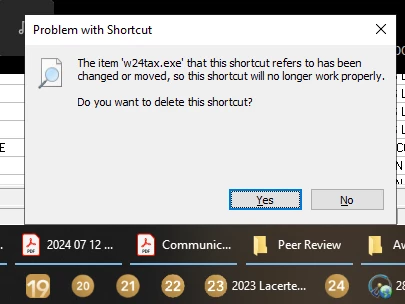
 

I have confirmed that the .exe still exists in the same place, and that each user can make a new shortcut if needed. I'm currently working with symbolic links as a temporary solution to the problem but would like to know if anyone had any information on this issue. 

    3 replies

    Level 2
    January 19, 2026

    This seems to be an ongoing issue since late in 2025. Every update for 2024 and 2025 eliminated the shortcut. 

    Level 4
    January 19, 2026

    I have this problem with both 2024 and 2025 (although for "pinned to taskbar" not desktop shortcuts), but most of the folks in my office do not. I have just accepted it as yet another inconvenience, but would love to follow in case there is a fix on the horizon.

    Kathi_at_Intuit
    Moderator
    January 24, 2026

    Hi @HBIT nice to see you in the Community and thanks for sharing the details about the 2024 desktop shortcuts seem to break with each update. We checked on this and were told that if a shortcut is created with the w24tax.exe file then each update would break it because the w24tax.exe file is stored in the program version folder which changes with each update. If a shortcut was made from the w24tax-launcher.exe (or w25tax-launcher.exe) file in the root of the tax folder (24tax or 25tax) then when the program is updated it knows where to look for the w24tax.exe file. If the shortcut was not made from the w24tax.exe file then we would contact Lacerte Support for assistance with this. 

    **Click the 👍Thumbs up icon to say thanks on a post, and click Best Answer to mark the post that answered your question.


