Do you have more than one firm/ERO making transmissions?
(We have a CPA whose firm we are acquiring, he still makes his own efile transmissions. Many times when I try to move from one module to another, I get told that I cannot because there is an ACK transmission being dealt with... turns out that it is his FID or SCO stuff being dealt with.
Once they are done, there is a pop-up saying "go to that module", and when I do there is another pop-up indicating <these client #s> to be dealt with. They are all his client #s. I click on the 'ignore' button and then never have to deal with them again, but they stay queued up for him to see.)
Are you able to do--for esignatures--something analagous to the "force ACK updates for these clients" in efiling? Highlight those three in the main client list, see what the EFile menu has for you?
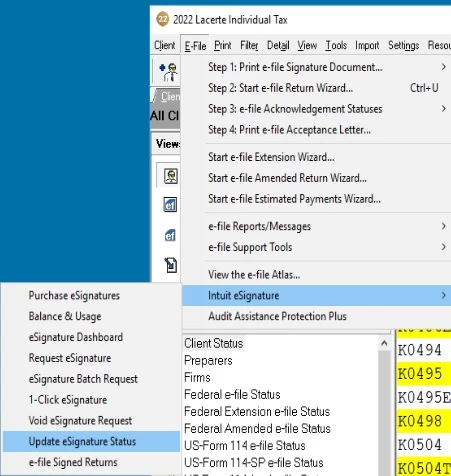
(Like the Alt+menu | EFile | Intuit ESignature | Update ESignature Status selection, for example....)
Robert
Thanks for your input DatabaseRobert!
Yes I tried all of the following (none worked).
1. Exit and restart Lacerte
2. Change from Individual to SCorp and back
3. Complete a WebInstall / force - Lacerte Tool Hub
4. Complete a Component reinstall - Lacerte Tool Hub
5. Insure that at the main client screen that, Views = All Clients and also that no Filter was applied.
6. Update eSignature Status
7. eSignature Dashboard - Insure no filter applied
8. Call Lacerte Help for eSignature. They were clueless.
NONE OF THE ABOVE WORKED.
HERE IS WHAT FINALLY WORKED:
Void eSignature. The Voided eSignature immediately appeared on the eSignature Dashboard.
Request a new eSignature. The new eSignature immediately appeared on the eSignature Dashboard.






