
Level 2
January 18, 2021
Solved

Client Status in Lacerte 2019

  • January 18, 2021
  • 1 reply
  • 8 views

I can only see clients with a "Final Status" in Lacerte 2019.  If I select filters for "Proforma", "Additional Information", "Extensions", etc., no clients are listed.  If I try to add a new client, it defaults to Proforma, but then disappears as soon as I select another client.  If I try to add a new client using an existing Client Number, I get an error message - "Client No. XXXX already exists."  I have rebooted my computer an restarted Lacerte several times and nothing changes.
This topic has been closed for replies.
Best answer by PhoebeRoberts

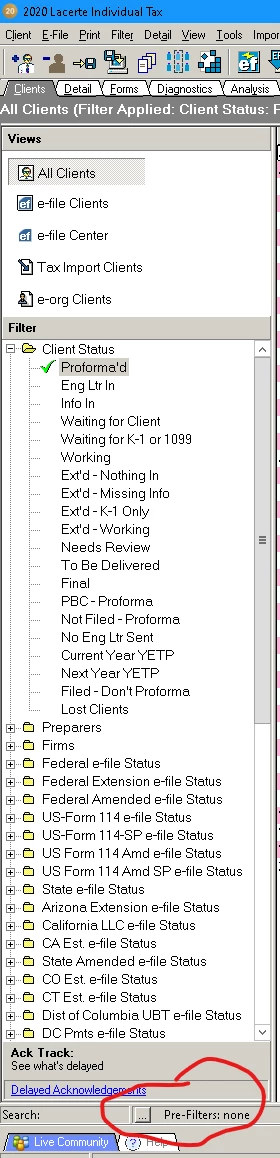
Make sure that down at the bottom (red circle) it says Pre-Filters: None. If it says anything else, click on the button with the three dots just to the left and click Reset and then OK.

Then at the top, under Filter, click Client Status (not any of the statuses underneath) to see your full client list.


1 reply

PhoebeRoberts
Intuit Community Champion
January 18, 2021

Make sure that down at the bottom (red circle) it says Pre-Filters: None. If it says anything else, click on the button with the three dots just to the left and click Reset and then OK.

Then at the top, under Filter, click Client Status (not any of the statuses underneath) to see your full client list.


AzPeteAuthor
Level 2
January 18, 2021

Thank you Phoebe.  You are my hero!


