
Level 3
June 30, 2021
Solved

Can't report home sale in non-resident state for resident state return in Lacerte

  • June 30, 2021
  • 1 reply
  • 8 views

I had a home in California, and I changed domicile to Arizona in November. That makes me a part year resident in California and Arizona.

In December, I sold the California home for $400,000. Although it was my primary residence, due to depreciation recapture, $10,000 of the sale is a gain subject to capital gains tax.

It is California sourced income, so the $10,000 gain gets allocated to California.

Since I was an Arizona resident at the time, the $10,000 gain also gets allocated to Arizona.

Lacerte is picking up the $10,000 gain in the Federal return, and in the California return, but not the Arizona return.

In screen 17.1 I entered the following information:

In screen 55.101 I indicated that I moved in Arizona in November and remained a resident as seen in this screenshot:
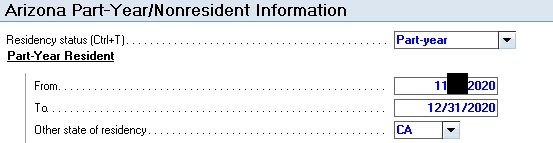
I therefore believe Lacerte has enough information to also allocate the 10,000 capital gain to Arizona's return. However, it is not, as you can see on line 20 of Arizona 140PY below:

Lacerte is only showing $6,000 for capital gains when it should show $16,000 for capital gains.

Again, ProShares does not have this problem. Me doing it by hand does not have this problem. It is therefore pretty frustrating to struggle with Lacerte on this. What am I doing wrong with Lacerte to not have it pick up this out of state sale during my Arizona residency period?

Thanks in advance for your assistance.
This topic has been closed for replies.
Best answer by Learner1

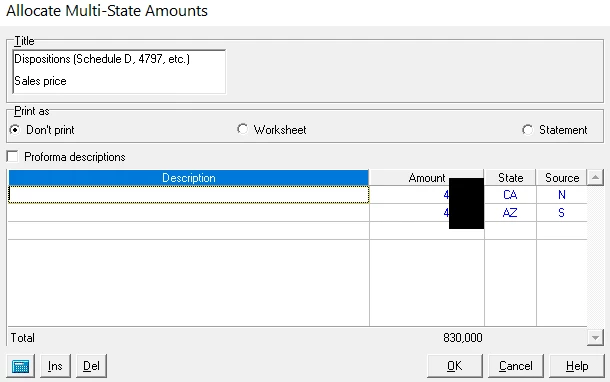
Okay, I arrived at the solution. For anyone who reads this after and is in a similar situation, you can fix this in screen 17.1 by essentially doublecounting as seen in the screenshot below:

You put in identical amounts, set the State to the State which return you need it to appear on, and crucially enter "S" for the source. The S flag bypasses the 8949 for that amount, so you do not double count it on your Federal return.

I still think this is something Lacerte should do automatically because it has all the information it needs to do so, but you can manually bypass it via this method.

1 reply

Learner1Author
Level 3
June 30, 2021

This forum doesn't like the screen shot I had for screen 17.1 so I am attaching it in this reply.

Learner1AuthorAnswer
Level 3
June 30, 2021

Okay, I arrived at the solution. For anyone who reads this after and is in a similar situation, you can fix this in screen 17.1 by essentially doublecounting as seen in the screenshot below:

You put in identical amounts, set the State to the State which return you need it to appear on, and crucially enter "S" for the source. The S flag bypasses the 8949 for that amount, so you do not double count it on your Federal return.

I still think this is something Lacerte should do automatically because it has all the information it needs to do so, but you can manually bypass it via this method.

BobKamman
Level 15
June 30, 2021

And California should be giving you credit for the tax paid to Arizona -- although with a short period of residency, there might not have been any.


