

Intuit Community Champion
December 13, 2024
Question

2024 Planner PREP file not working

  • December 13, 2024
  • 2 replies
  • 12 views

I'm getting the error in the top of the screenshot below.

I've tried the steps in this article and it's not working. https://accountants.intuit.com/support/en-us/help-article/license-information/resolve-prep-file-found-error-lacerte-tax-planner/L7qrPrUXg_US_en_US See bottom of the screenshot below to see the PREP file in the folder.
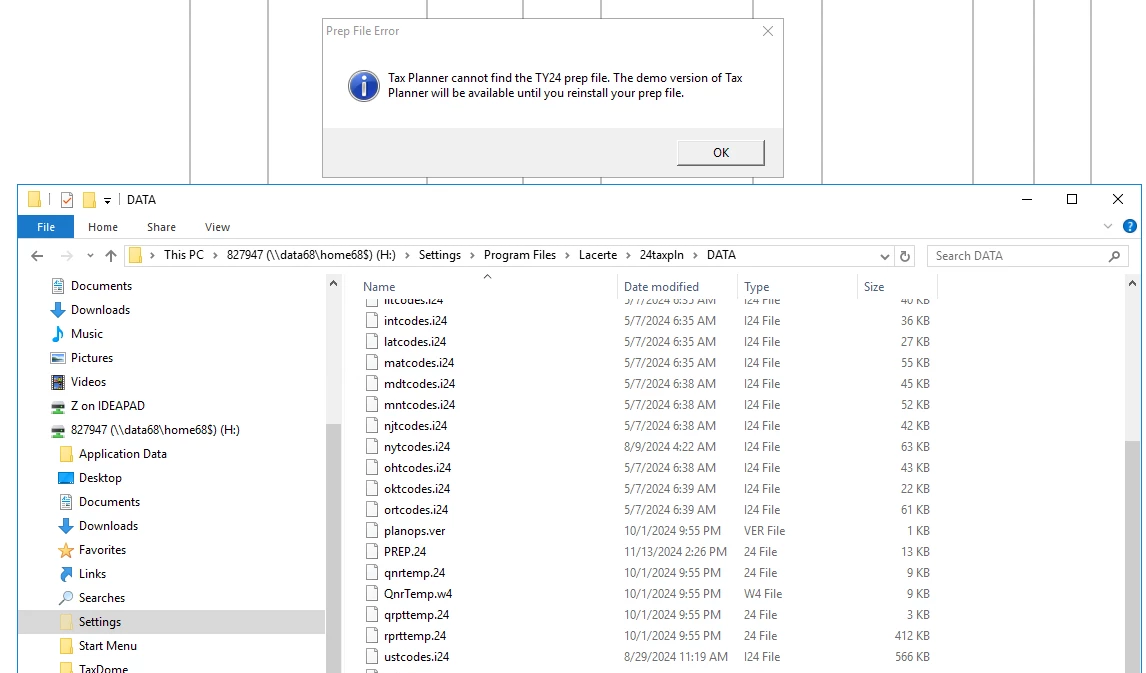
Any ideas of how to get out of the demo of the 2024 Tax Planner? I hadn't realized this glitch before I built my first tax plan and then couldn't save it. Ugh!

2 replies

George4Tacks
Level 15
December 13, 2024

I get this pop up

It says you are jumping the gun. Use 2023 for now. 

Answers are easy. Questions are hard!
KarlIntuit Community ChampionAuthor
Intuit Community Champion
December 13, 2024

Your screenshot is talking about Intuit Tax Advisor. I'm asking about Lacerte Tax Planner.

*If this (or another answer/reply) solves your problem, please click "Accept as Solution" to get this post out of the "Unanswered" queue of posts.*
George4Tacks
Level 15
December 13, 2024

I think you are still jumping the gun. I currently have one 2024 client opened (me.) I opened 2024 tax planner, which is for 2025 planning and tried to import my one 2024 client.  It seems to work alright.

I would use windows to remove 2024 tax plan. I would then use 2024 Lacerte for Settings > Update Prepare File to be sure prep file is up to date. Next reinstall 2024 tax plan. 

Maybe just do the update prep file and try again with tax planner. 

Answers are easy. Questions are hard!
KarlIntuit Community ChampionAuthor
Intuit Community Champion
December 16, 2024

Update: I did end up calling support about this on Friday. They said it's supposed to be working, that it's not too early. They tried with me for an hour to fix it but to no avail. I had to leave for another meeting, so never got resolution. Hopefully it will get fixed soon.

*If this (or another answer/reply) solves your problem, please click "Accept as Solution" to get this post out of the "Unanswered" queue of posts.*


