
Level 3
January 20, 2025
Solved

2024 Lacerte Update

  • January 20, 2025
  • 3 replies
  • 16 views

With the new background updates, I am not getting any updates and I assume some forms are available.  Ideas?  Called Lacerte and got the message they are closed for the holiday.

Thanks

    This topic has been closed for replies.
    Best answer by George4Tacks

    If you use Tools > Check for updates you should get this as of 1/20/2025 or something similar after this date
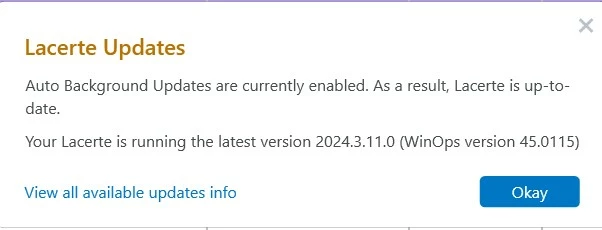
     

    If you are not seeing this and you are not offered an update, then close the program and

    Press the  Windows key

    Type "2024 Lacerte Web Setup" and click what shows up to run. That will do a new install with the latest update

    Here is the article on Silent Updates

    Here is the article on Which Version do I have?

    3 replies

    Level 2
    January 20, 2025

    We have the same question...we have no idea if we are working with the most current version at this time...

    George4Tacks
    Level 15
    January 20, 2025

    If you use Tools > Check for updates you should get this as of 1/20/2025 or something similar after this date


    If you are not seeing this and you are not offered an update, then close the program and

    Press the  Windows key

    Type "2024 Lacerte Web Setup" and click what shows up to run. That will do a new install with the latest update

    Here is the article on Silent Updates

    Here is the article on Which Version do I have?

    Answers are easy. Questions are hard!
    Level 3
    January 23, 2025

    We are having a similar issue, but when we check to see if we are on the most current version, it gives us an error regarding administrative privileges.  We have never had that issue before with prior versions, and both the owner and I are Administrators on our account.  Additionally, the Background Updates option is "Grey-ed Out".   We actually had to go to our ProConnect dashboard and re-download the 2024 software to get all the updates that have been issued thus far.  I don't think we should have to be doing that.   If any one has thoughts on either of these, please let me know.  If not, I will reach out to Lacerte Support again.  Thanks so much....in advance.

    Level 6
    January 24, 2025

    Under tools our updates is shaded. I have called before . We are on a network. This is a pain to keep running tool hub. No help from Lacerte. This is ridiculous. We have no forms showing.  Not a happy camper.


    Michele

    Level 2
    January 28, 2025

    Michele - you are not alone - this is ridiculous.

    Drphibes
    Level 6
    January 31, 2025

    We are not happy either.

    As of 6:26pm PST:

    One machine in the office shows version 2024.4.12.0 winops 45.0115 and says it's up to date.  Another machine in the office shows version 2024.4.8.0 winops 45.0115 and says it's up to date.  The latest winops is version 45.0129 according to the update page on the link "View all available updates info".  Not a lot of confidence in this new download system at this point...


