Level 2
September 11, 2023
New

Please Implement Grouped Bookmarks on PDFs of Tax Returns

Related products:Lacerte
  • September 11, 2023
  • 3 replies
  • 5 views

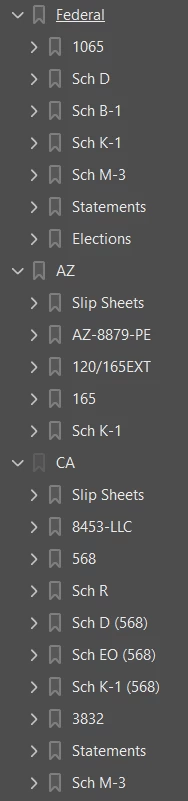
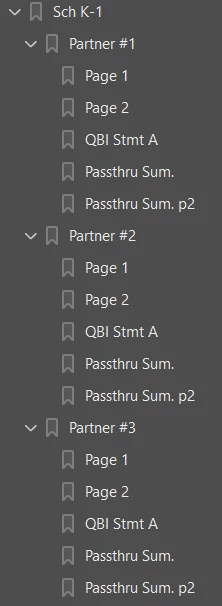
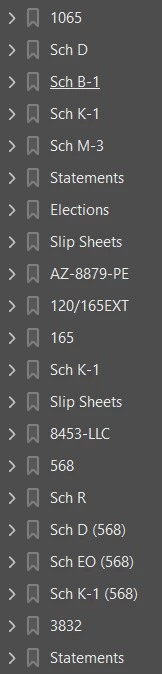
Please change the automatic bookmarking system when printing a tax return directly to PDF to instead group the bookmarks by the taxing jurisdiction.  It is quite difficult to navigate through the bookmarks of a multi-state tax return when they are shown on one large list and are labeled only as the form numbers.

Current format                                                                                                            Proposed format


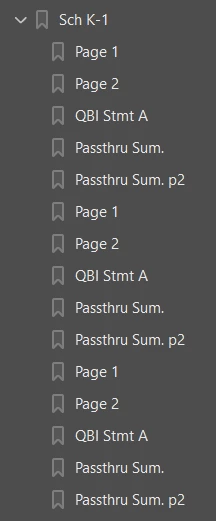
Also, please group the K-1s by partner / shareholder numbers or names instead of showing "page 1" on each new beginning K-1.

Current format                                                                                                            Proposed format
3 replies

Level 2
January 25, 2024

this is a great idea! i just called up asking how to bookmark my pdfs.

the rep couldn't give me an answer. seems like you enabled bookmarks.

can you tell me how to enable them? right now, we print to pdfs and the bookmarks are pages, its terrible!

ABadolatoAuthor
Level 2
February 1, 2024

When printing directly to PDF, the output comes in the bookmarked format shown on the left-most screenshots.  My idea was to refine the automatic bookmarking process to produce bookmarks as shown in the right-most column.  I manually created the additional bookmarks.


Level 2
February 23, 2024

Agree 100%. Must have to compete with the product coming from other tax packages.