
Level 4
February 24, 2025
New

Need an EASY way to make a Detroit return nonresident

Related products:ProConnect
  • February 24, 2025
  • 3 replies
  • 14 views

SAVE US FROM THE DETROIT NONRESIDENT NIGHTMARE 

Detroit nonresident returns should be set either in Profile by giving us the option to add a Detroit nonresident return in the City return window or an easy check box in client data when a Detroit return is present.

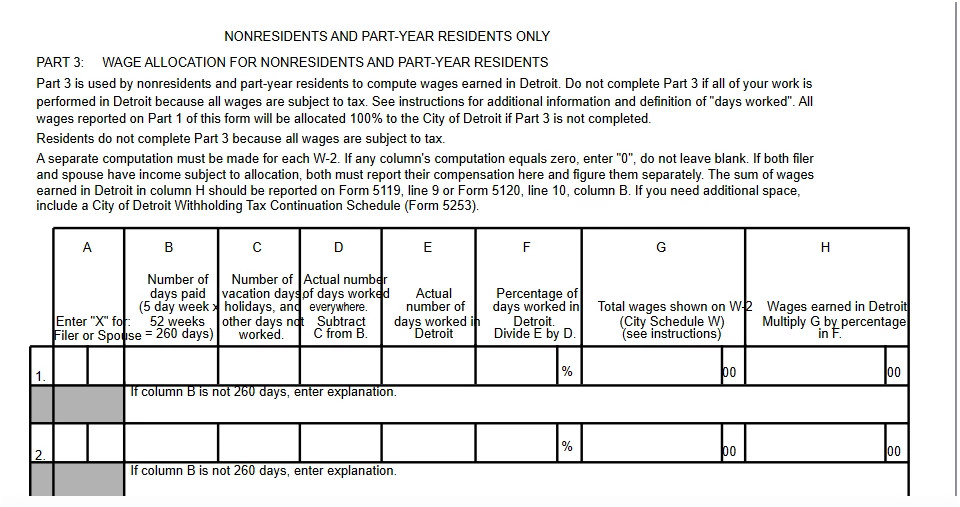
Currently, the torture is to make entries for dates and days worked in the W-2 local area. This is so tricky that I've been unable to get the 5119 Nonresident return to pop in. Instead, the 5118 resident return pops in.

I have one other client in this situation. I looked at the entries I had for her and emulated them in this return. No luck.

5121 Mess

The other issue is a 5121 withholding schedule loads, and page 2 contains Part 3 that will reflect entries for nonresidents.

Unfortunately, these fields are not live; if we could click on them perhaps we would get to the right spot.

Need Better Help, Too

Help on this topic is useless. That needs improvement, too.

I've spent at least two hours trying to resolve this mess, plus a call to support. There's no obvious fix to them either. I can't bill the client for this wasted time, since it's not his fault.

HELP!


3 replies

Level 2
March 10, 2026

Did you ever figure out a solution? I am running into the same problem now. Thanks!


Moderator
March 10, 2026

Hi @SteveD19 Have you tried calling ProConnect Support about this?  They will be able to remote in and see what you're seeing.  They have the tools to determine if it’s a quick fix, a change in instructions, or a potential defect and whether it’s an issue we’re already reviewing or a brand-new one we need to get reported.

Reporting it through the proper channel ensures your specific case gets documented and addressed by the people who can fix it.

Thanks for helping us out by calling support to properly document this issue. 

Level 4
March 11, 2026

The answer is a little tricky. Here's how to do it - totally unintuitive and easily missed:


  1. From the index go to Taxes, Michigan Cities
  2. Look way up on the right of this screen and you'll see the word "Cities" - it's a link. Click it.
  3. Now in the top box drop down the city name e.g. Detroit
  4. In the box just below drop down to #2: taxpayer is a nonresident.


That should generate the non-resident return 


What I was hoping for was some simple check box somewhere to indicate nonresident status or the consistency that's in most other state forms.


Good luck!


